2007-06-19

3G4Linux

Since I can't get broadband in my dormitory up north, I have decided to go halves for the cost of Telstra 3G Wireless Broadband with a workmate of mine. Problem is this. I refuse to put ANY windows machine onto the internet without a free (and fully functional) open source firewall solution.

So I decided to look (again) at windows-based free open source firewall software and here it is! WIPFW. If it's truly based on OpenBSD's pf, it sounds very promising. (yes I'm a big OpenBSD fan). It has a very experimental GUI, but I don't necessarily need it.

Acording to this article I think it might actually be a better idea to just buy a Motium MPC-210 Mobility PC (or equivalent cheap but small machine) for use as a (Gentoo) Linux firewall for this thing. Probem is, I have have never used iptables before :P

2007-05-21

Breaking My Gentoo

After much deliberation and scouring the net for a Linux command-line based passwordsafe (and ompatible with Counterpane's Password Safe) program, I found pwsafe.

This seems like the ideal app that I had in mind, problem is it's not masked or even in portage!
Not to worry! Gentoo Sunrise has come to my rescue!

There is an overlay for it that seems like it's in the process of being reviewed, however it hasn't got a maintainer (this is probably the reason why it's not in portage yet).

Now I am wondering if I should just add it and install it using the once off ACCEPT_KEYWORDS="~x86" use flag and hope that it doesn't kill my system.
I already have the masked version of Hamachi installed how can this be any different?

I think I will end up installing yet another masked package :P

/crazy

2007-05-13

New Monitor

Not much to blog except for the fact that I have just purchased a Dell 27" Monitor (2707WFP) ^_^

Now that I have my old 17" up north in my dormitory, I have determined that I probably should have done it the other way around :P

Oh well, at least sending it to the Perth office helps guarantee delivery.

2007-04-28

Microsoft Breaks Automatic Updates

I have discovered that Microsoft®'s own Automatic Updates service for both Windows® XP and Windows® 2000 is broken. There is a KB article that states that there is a known problem with Widown Updates that sometimes causes 100% CPU utilization (more like always!), causing the operating system to become unresponsive.

Although Microsoft have released not one, but two patches for this problem, it still exists! but here's the kicker: Not only is the patch not included in Windows Updates, but it isn't even available for Windows® 2000!!?!??!!

<sarcasm>
Great to see Microsoft® continuing to make quality software!
</sarcasm>

2007-04-23

CD Backup Script (Updated)

Bellow is an updated version of my CD backup script that I developed a while back:


#!/bin/sh
#
version="1.5.5"
version_date="Mon Oct 30 15:59:14 WST 2006"
version_author="Dean Bergin (dean.bergin@gmail.com)"
version_desc="A basic automated CD backup script"

master()
{
# initiate a variable to hold the iso filename as a sting
iso_filename=backup-`date +%Y%m%d`.iso
# Check for existance of an iso with the same datestamp
# and rename acordingly
if [ -f /u1/${iso_filename} ]
then
mv /u1/${iso_filename} /u1/old.${iso_filename}
mkisofs -v -J -V backup -A '' -N -sysid '' -o /u1/$iso_filename $backup_dir
else
# TODO: Add more checking to see if the files we have for
# a backup will fit onto a CD

# If all is fine then go ahead and make the iso
mkisofs -v -J -V backup -A '' -N -sysid '' -o /u1/$iso_filename $backup_dir
chmod 0740 $iso_filename

fi
}

archive()
{
# Initialise a list of directories to include in the backup cycle
dirlist="/boot /etc /root /tmp /var"
# Dynamically create tarballs based on the directory names
for dirname in $dirlist
do
tar cfvz ${backup_dir}${dirname}.tgz $dirname
done
# This section deals with specific exceptions for dirictory names
# that requires additional filename formatting
tar cfvz ${backup_dir}/usr-home.tgz /usr/home
}

# Directory cleaning function that will automatically delete
# all files in the $backup_dir automatically. It is assumed that
# previous backup iso's have been performed
clean()
{
for file in `ls ${backup_dir}`
do
rm -rf $file
done
}

# Initialise $backup_dir and give it a value
backup_dir="/u1/backup"
# call the custom made functions
clean
archive
master


DISCLAMER:
This script has been tested, and works fine (on my own system).
Feel free to copy and modify this script to suit your own needs, but don't come crying to me if it doesn't work on your system! There is no warranty or any of that stuff and the above code is provided "as-is". Perhaps you should write your own scripts then you won't have to worry about all this legal stuff :)

Converted to Genkernel

Genkernel makes Admin on a Linux system easy!

In one single step (genkernel all), Genkernel can:


  • Create a (custom-built) kernel (bzImage) from the latest sources.

  • Make kernel modules and install them.

  • Include all (custom) CHOST optimisations that are set in make.conf in your kernel

  • Minimise human error (ie. manually copying a kernel bzImage and forgetting to rename it or relink it etc).


Not only but also, genkernel keeps config files in it's own directory (/usr/share/genkernel by default) so that means I never have to worry about whether I copied the previous kernel .config file from /usr/src/linux before purging older kernel sources by running: emerge -Pa gentoo-sources

I recommend Genkernel not only to newbies but also to Linux pros that want to make kernel upgrades less of a troublesome task.

/hug Gentoo

2007-04-06

Screen makes mv dissapear

bash: /usr/bin/mv: No such file or directory

Just discovered this error today. Seems that screen (v 4.00.03) occasionally breaks coreutils/bash in that it can't find the mv executable in any other screen other than the first one that you create...

Not sure how screen actually works, but it seems like theres a bug in the way that it handles creating a new environment for a screen when using the -t option (or mabee when you try pass it a command enclosed in `'s)

Tempted to post this as a bug, but I have never done a bug report, and I haven't got the time to investigate why this is (intermittently) happening. Besides, I would much rather rant here on my blog :P

2007-03-25

Gentoo GNU/Linux LiveUSB

Not long after buying a 10Gb ASTONE USB Mass storage device, I decided to turn it into a portable OS. Naturally, I chose Gentoo :)

One small hitch that I came across was the fact that busybox was failing to compile. This is how I fixed it.
emerge --sync
emerge binutils
emerge busybox

Now all I need to do is get wireless support/war-driving tools and some other rescue utils installed and noone will be able t stop me!

Have I ever told you that I love using Gentoo? :P

2007-03-09

DVD Burning annoyances

About 2-3 years ago I noticed that JΓΆrg Schilling had developed Cdrecord-ProDVD, and being that I was quite happy with using cdrtools on both Linux and Windows, I decided to give his DVD burning software a try.

Cdrecord-ProDVD worked reasonably well on Linux (apart from the annoying licensing variable), however It would NOT run under Windows at all. Today I thought I would revisit the use of it it and try to get it working again, but to no avail.

Apart from the fact that JΓΆrg Schilling doesn't like Windows, why is it that Linux gets free, powerfull, and working (command-line!) DVD burning software and Windows get's none?

Now the only thing that's in the way of me ditching windows in favour of Gentoo on my desktop is WoW :P

2007-02-06

Linux Kernel Fun: Adding a new IDE Controller

I managed to afford a new HDD for my upgrades and an IDE addon card to boot (<--- Pun intended :)

The plan:


  • Buy new 250Gb IDE HDD

  • Swap the 200Gb currently in my fileserver with the new 250Gb HDD

  • Swap the (newer) 200Gb taken out of my fileserver with the (older) 200Gb HDD in my XBOX and vicea versa

  • Install an IDE addon card into fileserver and attach the 200Gb to it


Most of this went well except for the addon card.
After many hours and 4-letter words being said, I realised that the new addon card wanted take over as the first available IDE chip after the kernel had initialised the hardware giving me VFS kernel panic errors even after changing the lilo 'root=' kernel option (and editing fstab). It seemed to work fine when I manually specified the root= option at the lilo prompt, but I was forgetting one important thing...

I forgot to use the kernel option "Boot off-board chipsets first support" which funnily enough tells you what the option is for in the linux kernel help: "This can improve the usability of some boot managers such as lilo when booting from a drive on an off-board controller."

Nuff' Said :P

2007-01-30

Dell BIOS Wierdness

Today I not only discovered that a Dell Inspiron D800 and a Precision M60 are essentially the same laptop (identical/interchangable M/B) with a different BIOS and to turn a Precision M60 into a Inspiron D800 is as simple as flashing the BIOS using a "/forcetype" as a command-line argument at run-time of the bios binary. Furthermore it seems that some (specifically the D800) BIOS binaries will run on either win32 or MS-DOS, but to get the previously mentioned hack to work, you have to use MS-DOS.


WARNING: Try this at your own risk. I will not be held accountable in any way shape or form if you turn your Lappy into a brick!


UPDATE (20070329): It seems that Dell still use similar motherboards for their D820/M65 product lines, but the BIOS from a D820 cannot be flashed to an M65 by using the /forcetype command-line switch anymore. Way to go Dell.

2007-01-21

V.Busy = "no WoW"

I have been so busy that I haven't even had time to pick up WoW since just before the expansion was available... until now, however I have been able to buy random assortments of gadgets and useful stuff, such as...


As for the StreetSmart® StreetExpress™ those not wanting to continually insert the the CD every time they want to use it, can simply copy Data directory into the installation point. This should also improve load-times too :)

2006-12-21

Work Ensues.... Soon.

I have managed to score a job through Canlde!

This job entails doing Dell service work through Unisys West and will probably continue on through while I am at UNI as well.

I am in the process of finishing up the necessary (online) training through the Dell Certified Systems Expert Certification program, which is proving to be very informative.

That being said I may be unable to blog certain information due to Dell/Unisys non-disclosure agreement(s).

Anyway, it looks like I might be able to afford to by a Dell 24" LCD Monitor [2407WFP] after all :)

2006-11-06

Gentoo business viability

After having a heated discussion (argument) on the weekend about it, my friends don't believe that Gentoo could be used as, or in a production server environment, sticking to their beliefs that Debian is a better choice because of it's (default) usage of binary packages as opposed to a source-based one and their idea that because Gentoo is ultimately more customizable, it is therefore more susceptible to "breaking".

So can any Linux distribution. An unskilled person with little or no knowledge should not maintain/administer a Gentoo system unless they are prepared to continually break their machine due to lack of knowledge of the system.

I can honestly say that my own (personal) Gentoo server has been "borked" before, but that was in my early initiation period in learning what NOT to do to in a Gentoo system (installing from the the wrong stage3 arch and accidentally forgetting to remove the ACCEPT_KEYWORDS="~x86" flag when doing a world update). Because of this, my friends have only given examples based on my early mistakes, but haven't provided any real evidence to back up their theory as to why Gentoo should NOT be used (as a production system).

If SUN have certified Gentoo for use on Sun Fire T1000 and T2000 machines doesn't this mean that Gentoo is worthy of being heralded as viable for production use?

Some of the reasons that I have abandoned Debian in favor of Gentoo is for that of customization, ease of package management using portage, having complete control of my system, ability to tune applications and the system itself for specific hardware optimization AND the availability of excellent howtos and official documentation.

I believe that a Gentoo system utilising the "hardened" profile and administered by a knowledgeable admin can provide high availability/uptime and be just as stable as any other Linux system if not more stable (especially with nice hardware such as that mentioned above).


"Do not judge me, until you have tried my way of life for yourselves". -- Bender (Futurama [episode 3ACV18 - Anthology of interest, Part 2])

2006-10-29

Invalid gcc profile

Tried to install a package today and received the following horrifying output from running emerge flac

configure: error: installation or configuration problem: C compiler cannot create executables.

Found out in this (excellent) Gentoo forum thread that it was only due to the fact that $CHOSTS flag (from /etc/make.conf) was not being exported at build-time due to gcc using an invalid profile.

So I ran gcc-config -l and sure enough it outputted the following:

# gcc-config -l

* /usr/bin/gcc-config: Profile does not exist or invalid setting for /etc/env.d/gcc/i686-pc-linux-gnu-4.1.1

[1] i686-pc-linux-gnu-4.1.1 * [invalid]


To fix this problem all I had to do was to run gcc-config again only this time I had to specify the profile to use which coincidently was the only one to use anyway.

# gcc-config 1
* Switching native-compiler to i686-pc-linux-gnu-4.1.1 ... [ ok ]


Now everything compiles properly. I believe this was caused after using revdep-rebuild which was recommended by emerge when I tried to use the prune option on the "world" ebuild meta-package with emerge -P world.

Dead XBOX HDD???

Yesterday (last night), It seemed like my (modded) XBOX HDD had died, however after testing it in a PC with the Western Digital Data LifeGuard Diagnostic tools it seemed fine and worked happily in my XBOX again.

It isn't the first time that I have had problems with it, but all it seems to take to fix most problems is to pull it apart and put it back together again. Perhaps the HDD is about to die soon?
Either way this has re-iterated the necessity for backups and prompted me to do so.

At least I have lftp avaliable to make the job a bit easier.

2006-10-28

Shell Scripting FTW

Today I made a nice little handy script that automates my (CD) backups for future cron job use.
Still requires more work so that it only outputs relevant info in cronjob logs.


#!/bin/sh

master()
{
tmp=${backup_dir}-`date +%Y%m%d`.iso
if [ -f $tmp ]
then
mv $tmp old.${tmp}
else
mkisofs -v -J -V backup -A '' -N -sysid '' -o $tmp $backup_dir
fi
}

archive()
{
list="/boot /etc /root /tmp /var"
other="/usr/home"

for index in $list
do
tar cfv ${backup_dir}/`basename ${index}`.tgz $index
done
tar cfvz ${backup_dir}/usr-home.tgz /usr/home/
}

clean()
{
for blah in `ls ${backup_dir}`
do
rm -rf $blah
done
}

backup_dir="/u1/backup"
clean
archive
master


<insert usual software disclamer here>

Comming soon: Howto setup cron :)

2006-10-25

Google Calendar Borked

I managed to bork my Google Calendar rendering the notifications/reminders feature unusable.

I only recently found out that you can only have notifications (reminders) for events that are in a primary calendar and the feature-lack was preventing me from being able to receive event notifications for a second Birthday calendar that I had made, so I decided to (backup) export my calendars, delete them and then recreate/rename them appropriately so that the Birthdays calendar was the primary and ...failed :P

Here is how I did it!

Step 1). Signed in.
Step 2). Exported all My Calendars to .ics (vCal) files via the private URL feature.
Step 3). Deleted ALL My Calendars (exept for the primary one).

Note: You cannot actually delete your primary calendar but you can delete all events.

Step 4). Created a new daily calendar for daily stuff (the only other calendar).
Step 5). Imported the Birthdays vCal file into the primary calendar and the everyday stuff vCal into the newly created one.

Both calendars now display an event notification icon in the top right-hand corner of the event, but only one calendar (the primary one) can actually edit notification info. It now fails to notify me of event reminders...

Earlier this afternoon I sent a small message off to Goggle to see if they can fix the problem, but I might have to get them to forciblly delete the primary calendar an/or delete the Calendar Service form my Gmail account.

2006-09-26

Windows XP Home Hasstle

How many of us geeks (that actially use windoze) use Windows XP Home? Almost None.
I found this out the hard way as I will explain bellow.

21/09/2006: A client came to me with a computer (compaq presario sr1128an) that had a failed HDD (Hard Disk Drive) and provided me with a new one to install.

22/09/2006: Installed new HDD (easy) and proceeded to install Windows XP, but realised that the client only had a Windows XP Home licence (sticker on the side of the machine).

23/09/2006: I had begun preparations to install Windows XP Home when I discovered that my own copy was broken! *sigh* Not only that but when I asked the Client to provide me with his copy he claims that he has lost it! Naturally I start calling favours from my other geek friends to locate a copy.

25/09/2006: This evening I finally located a copy of Windows XP Home locally (I don't trust downloaded copies) but to my horror it was a DeLLified copy for a dell inspirion laptop. *sigh*

26/09/2006: Began the arduous task of un-dellifying the CD... Here is what I had to do;
1) Copy the contents of the CD to a temp folder.
2) Deleted the $OEM$ folder and the following files
i386\compdata\dellps.htm
i386\compdata\dellps.txt
i386\compdata\dellth.htm
i386\compdata\dellth.txt
i386\!dell_xp.cab
i386\!dpchfen.cab
i386\!pcvenxp.cab
i386\txtsetup.sif
3) Overwrote the file CD:\i386\winnt.sif with my own unnatended setup.
4) renamed i386\txtsetup.sif.txt to txtsetup.sif and removed lines 257-259 (inclusive).
5) Tested the CD iso image with VMware after re-mastering it with mkisofs2.

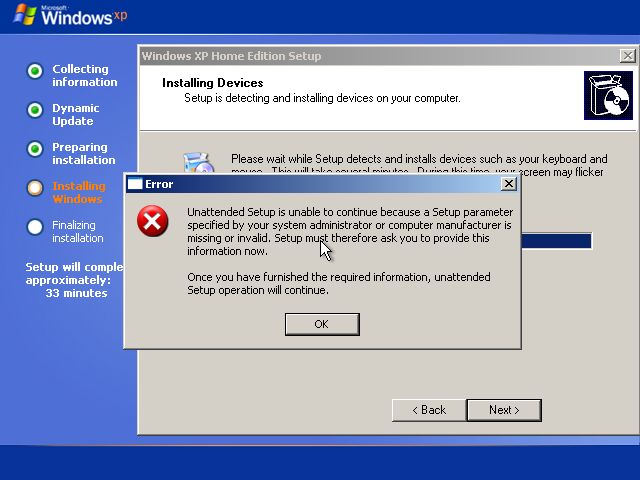
Apart from receiving the following error message, the CD seems to install a Dell-Free version of Windows XP Home ^_^


If anyone has more information on how to fix this so that the errormessage does not show up please email me at dean[dot]bergin[at]gmail.com

2006-08-18

Debian Misconceptions

As a follow-up from my previous post, Is Gentoo becoming more like Debian? I unfairly treated Debian as an outdated distribution without proving the full facts.

A friend of mine (who knows the OS much better than I do), provided me with a more realistic insight into the misconceptions of Debian being an outdated distribution.

He writes:


"Debian isn't really outdated. This is really bad misconception.

And the misconception stems from the fact that those who don't know Debian believe Debian is just one GNU/Linux distribution. It's not.

Debian is in fact several different distributions.

The main one's of which are Debian GNU/Linux Stable, Debian GNU/Linux Testing and Debian GNU/Linux Unstable (for the purposes of this article, I'll here on in call them Stable, Testing and Unstable respectively). Other Debian distributions include GNU/Linux Experimental, GNU/Linux Frozen and even GNU/Hurd, but they are not as widely used by Debian users and are not central to my point).

Which one of the main three you choose is depending on what you require from your software distribution.

Unstable is a developer's playground. Unstable is where new packages are introduced in to the system by the Debian Developers. It is considered bleeding-edge, as it receives new functionality (new software versions) daily. While the quality of Debian software is generally very good, sometimes Unstable breaks in bad ways (e.g. loss of data, or requiring you to rebuild the machine). If you must have the latest and greatest of every application version on your computer, regardless of the fact that your machine might get hosed every now and again, use Unstable and be prepared to fix your machine if it breaks.


Testing is a good trade off between the latest applications and better quality then Unstable. Packages are only introduced in to Testing after 12 days of no one reporting a bug in the Unstable package.
This means that when Testing breaks, it's usually a trivial part of the system rather than debilitating the whole system. It's not an absolute guarantee, but the Debian Developers and Users are usually pretty good about noticing problems in Unstable before they get moved in to Testing. If you want a reasonable amount of quality and mostly up to date application versions, Testing can balance this trade-off quite well.

Finally, let me dispell a final myth about Debian software. Stable is indeed updated frequently but with a catch, only for bug fixes. Once a new version of Stable is released, the only reason it will receive an update is to correct security flaws that are discovered in its software. And while this means that no new software functionality is added, it also means you get really good quality software that is frequently updated for security problems. If you require really good quality software with as little downtime for breakages as possible (say on production servers that run 24x7), Stable is what you want.

So yes, while Debian Stable has fewer functionality upgrades than Gentoo, it is actually desirable to be so. Stable means to be (like the name says), stable. If you want more up to date software, you may wish to consider Testing or Unstable depending on your proficiency or willingness to fix breakages.

And now you know that Debian is updated constantly - just with different caveats attached depending on which of the Debian distributions you choose.

P.S. More information on Debian release cycles and Debian distribution goals can be found at Debian’s website (http://www.debian.org/releases/). If you wish to know how Testing becomes Stable, follow the links on that page to the Debian FAQ."


Thanks go out to Spods for providing an insight into this issue.
Till next time.

 
Google+