Showing posts with label windows. Show all posts

2020-07-25

Adventures in Open Source (Part 3)

The (somewhat) popular Adventures in Open Source series is back and even better than before

SYSLINUX
Along time ago and, I was able to force a Toshiba Satellite A10 to boot a Ghost Boot Wizard created disc (ISO) thanks to syslinux.
This seemed kind of tricky to begin with but looking back on it, it is pretty trivial.

First of all I mounted the ghost iso file as loopback and copied the file contents to a temporary directory ($pathspec can be any empty temporary directory such as /tmp/ghost).

sudo mount -o loop /usr/temp/ghost.iso /mnt/loop0
cp -R /mnt/loop0/* $pathspec

Next up I copied the necessary syslinux files to the temporary directory
cp /usr/lib/syslinux/isolinux.bin $pathspec
cp /usr/lib/syslinux/memdisk /$pathspec

I then had to create an isolinux configuration file called isolinux.cfg in the temporary ($pathspec) directory with the following contents.
cat > $pathspec/isolinux.cfg default ghost timeout 150 prompt 1 label ghost kernel memdisk append initrd=osboot.img ^Z

Lastly, I moved up one directory and created the iso with mkisofs/genisoimage
cd ..
mkisofs -v -J -V $volid -N -A '' -sysid '' -o $filename -b isolinux.bin -c boot.cat \
-no-emul-boot --boot-load-size 4 -boot-info-table $pathspec

That's all!

NOTE: Due to the varying nature of Linux distributions, I have purposefully used variables (named in accordance with mkisofs/genisoimage documentation) so as to aid in making this procedure as dynamic as possible.


ntfsclone(8)
Since I still help people with Windows (only close friends and relatives now), and I decided to give this tool another try (last time I used it, I used the "special" image format, which cannot be loopback mounted).

Bellow is the output (proof) of a successful ntfsclone (and ntfs-3g loopback mount).
localhost ~ # ntfsclone -o /u1/S3A1378D001-ntfsclone.img /dev/sde1ntfsclone v2.0.0 (libntfs 10:0:0)NTFS volume version: 3.1Cluster size : 4096 bytesCurrent volume size: 39999500288 bytes (40000 MB)Current device size: 39999504384 bytes (40000 MB)Scanning volume ...100.00 percent completedAccounting clusters ...Space in use : 13676 MB (34.2%)Cloning NTFS ...100.00 percent completedSyncing ...

This is me loopback mounting a standard ntfsclone (not special image format) image:
ntfs-3g -o loop /u1/S3A1378D001a-ntfsclone2.img /mnt/loop0mount | grep fuse/u1/S3A1378D001a-ntfsclone2.img on /mnt/loop0 type fuse (rw,noatime,allow_other)


2009-11-25

xbox360 and WMP11 fail

After about two years of procrastination, I finally got an xbox360 to fulfil my Burnout gaming needs. Before I got the (MW2) bundle, I installed Windows Media Player 11 (using the validation bypass trick). Now sitting here relieved that I finally got media sharing to work, I thought I'd blog about the one simple thing wrong with media sharing:

  1. UNC network paths.
It took almost 2 weeks to find an answer to why my library was not showing up on the xbox360 and the answer lies here.

In summary (for those that don't want to follow that URL for some reason):

"If you want to share files that are not located locally on your machine, Microsoft has chosen to prevent you from sharing content located on network locations (UNC paths) like \\MACHINENAME\sharename"

Luckilly there is an undocumented registry "hack" that will fix this:

Windows Registry Editor Version 5.00

[HKEY_LOCAL_MACHINE\SOFTWARE\Microsoft\MediaPlayer\Preferences\HME]
“EnableRemoteContentSharing”=dword:00000001

Huge thanks go out to GibStorm for documenting this so well...

2008-11-29

moar storage

I acquired two more 1Tb HDD's effectively making my current total storage space about 4Tb.

I want to software raid my 1Tb disks, but I need a silent UPS before I can (this system sits in my room, so I don't it waking me or anyone else if the power drops during the night), so my server is going to have to stay JBOD for now *sigh*

I am also contemplating putting Vista (x64) onto my lappy to make it easier for work, but I can't bear to loose my Gentoo/KDE after all the hard work that I have done in getting it functional.

I need to make some hard decisions here...

Also, I will hopefully get around to implementing IPTABLES + bridged mode modem + pppoe on my fileserver soon :)

2008-03-23

Adventures in Open Source (Part 1)

Welcome to the "Adventures in Open Source Series"!

Since buying my Dell XPS M1730, I have been using Gentoo Linux on it exclusively and with surprisingly good results, however I have also learned allot more about certain open source software package in general, so here I will outline some of the these (and also some of the failures) that I've experienced so far.

Screen
I have learned to use screen in a much more powerful way than ever before. Until now I was not aware of screen's configuration file capabilities, so had never used it. I found that not only can you make screen automagically setup all your screens for you, but you can also do some awesome console customisation as well (see my ~/.screenrc bellow).


screen -t default
screen -t "compile (emerge)"
screen -t config
screen -t rtorrent rtorrent
screen -t misc
hardstatus alwayslastline
hardstatus string '%{= kG}%-Lw%{= kW}%50> %n%f* %t%{= kG}%+Lw%< %{= kG}%-=%c:%s%{-}'

Here is a picture of what it looks like:

PS: This is actually in use on my fileserver (also a Gentoo box), hence the different hostname.

TrueCrypt
Since I almost lost my band new 8Gb USB mass storage device at UNI last week, I have decided to start using cryptography, so I remembered reading a planet.gentoo.org article about it and considering I am using Linux at home and Windows *shudder* Vista at UNI, I thought I would give this a try, Not just for portability and security but for any easy backup mechanism also (all I have to backup/synchronise one single file rather than managing lots of files and folders).

I followed the guide on the Gentoo Wiki here, and created a new volume now all I have to do is mount it and it's all there!

dean@quagmire ~ $ truecrypt -u /media/UNI/uni-2008-semester1.dat /media/UNI/uni
Enter password for '/media/UNI/uni-2008-semester1.dat':
dean@quagmire ~ $ ls -alh /media/UNI/uni
total 24K
drwx------ 6 dean dean 4.0K 1970-01-01 08:00 .
drwxr-xr-x 4 dean root 4.0K 1970-01-01 08:00 ..
drwx------ 6 dean dean 4.0K 2008-03-23 12:30 csg2207
drwx------ 7 dean dean 4.0K 2008-03-23 12:30 csg3308
drwx------ 7 dean dean 4.0K 2008-03-23 12:30 csi2102
drwx------ 7 dean dean 4.0K 2008-03-23 12:30 csi3207

And of course here's the proof that it's all working:

dean@quagmire ~ $ mount |grep -i truecrypt
/dev/mapper/truecrypt0 on /media/UNI/uni type vfat (rw,uid=1000,gid=1000,umask=077)
dean@quagmire ~ $

Wine
Well, as you may or may not be aware, my wine success has been pretty hit and miss (more like miss when it comes to M$ products and games), but this is due to the fact that wine is considered to be in perpetual development and the fact that I am trying to run proprietary software on a non-native platform *wink*

VirtualBox OSE
Alright, I must admit that I had an issue with this piece of software, but once I got it working it ran like a dream... I've been able to install Windows XP and (of course) Gentoo into Virtual Machines with no hassles whatsoever!


So it seems that I am not only more productive with a powerful Linux desktop, but I am also a much happier computer user as a whole even with the few "glitches" the arise every now and again.

If you learned something, enjoyed reading this article or have anything to contribute (or correct) ,feel free to leave feedback as comments on this post.


Coming soon: "Adventures in Open Source (Part 2)"!

2007-12-08

Dell (Australia) Refuses Vista Refunds

It would seem that after contacting Dell for about 5 days straight, I have been thusfar unable to obtain a refund for my UNUSED copy of Windows® Vista™ Home Premium (32bit) that came with my XPS M1730.

Here are some of the lame "reasons" they gave me:


  • We are unable to refund due to Microsoft Licensing.
  • You accepted the agreement when you purchased the computer online as part of our policy.
  • You will be breaching the Microsoft License if you send the product back.
  • Because this is OEM version, we are unable to provide a refund because it is bundled with your computer.

These "reasons" didn't seem to make any sense, so I did some digging around on the Dell website for these policies and this is what I came up with:

The Dell's "Total Satisfaction" Policy states the following:
"You may return software for refund or credit only if the sealed package containing the diskette(s) or CD(s) is unopened"

I also checked their Terms and Conditions of Sale ("Terms and Conditions") and that states the following:

"All software provided is subject to the terms and conditions of the license agreement relating to that software. Customer acknowledges its obligations to abide by such license agreements. Customer acknowledges that Dell does not warrant any software under these Terms and Conditions. In addition to any rights the customer may have under statute, all software is warranted in accordance with the license agreement that governs its use."

So, if I do NOT to agree to the the Windows® Vista™ EULA and adhere to the conditions within it (don't use it and uninstall said software), am I not entitled to a refund???

One thing is for sure: The call centre minions at Dell don't know ANYTHING about software licensing and are not trained to deal with this situation, which means I am now stuck with a rather expensive coaster :P


UPDATE: 08/12/2007 @1620
I have lodged a complaint with OFT as I believe that Dell is not acting in accordance with their own policies and is therefore acting illegally by refusing a refund (IANAL).

UPDATE: 03/01/2008 @1605
I got a call from an Australian Dell representative (Sydney) and they left a message for me to contact them, just have to wait until 10/01/2008 before I can call him. Hopefully he can give me some good news...

UPDATE: 06/06/2008 @1036
This is a very late update. There will be no refund from Dell as I have not only lost the telephone number for the person I needed to speak to, but I have failed to get this done within 90 days of the purchase, due mainly to work and the fact that I don't want to have to do this process in a hurry again. Since the release of Windows® Vista™ I will no longer use windows for personal use (and soon to be for work use to), so even though I will have to go this process yet again, my next Dell Notebook *WILL* be Windows-free!

2007-08-18

CIFS and Windows Server 2003

Today I had an incident this morning (which, as of the time of writing this, I am still working on) where a Windows XP machine decided to BSOD with the UNMOUNTABLE_BOOT_VOLUME.

Doesn't surprise me to see that the KB article above won't help me fix this issue as I found out a few hours later that there was a power surge from the night before!!!

So to fix this I (naturally) fired up a Linux distro (this time it was Knoppix

Next up I begin receiving this error when trying to connect to mapped network drives for storage of the recovered data using smbmount(8)...

    cli_negprot: SMB signing is mandatory
4650: protocol negotiation failed
SMB connection failed

Well, after about 5 minutes of pulling my hair out while googling for a solution, I found the answer!!! CIFS! I thought that smbmount(8) was broken (I've had some bad experience in the past) however it seems that if if you use CIFS instead it will happily connect to a Windows 2003 Server file share!!

Now if only I could get all this data recovered :P

Time to call Dell for a replacement HDD (gotta love their support) and purchase one in the interim...

2007-08-16

Random Post #2

I used the Dell Support Request form for the first time and noticed that the fscking web application won't work with a standards compliant browser (Mozilla Firefox) *argh*

I am also starting to really dislike administering Windows servers at the moment because of weird user home directory permissions and active directory in general (replication times over frame really are soooooo sloooowwww!)

Not only, but also, I am in the process of migrating my DCSE to a self-managed account so that regardless of what company I work for, I will always have access to, and be able to manage my DCSE profile.

CLI-Tip #0001:


mstsc /v:server

This allows a user to quickly connect to a server running
terminal services (or a Windoes XP machine with remote
desktop configured) by specifying the name or IP address
on the command-line. Very handy for those that use
"rdesktop" alot :)

2007-08-05

Cygwin is broken.. no wait! windows is!!

Well I was starting to wonder why my good 'ol mkisofs for windows (cygwyn port) was not working.

I'd had this issue such a long time ago but I forgot how to overcome it because I didn't have a blog back then and didn't bother to document any of the technical stuff I did (I'm also still lazy that I don't document these sorts of things, but instead I occasionally blog it here)

Anyways here goes:

I usually like to dump my command-line tools in %SystemRoot%\commands and seperate some of the bigger projects and utils that need additional libraries (cygwin is one of them) and throw them into seperate directories underneath that one and put all the path environment variables into windows so that everything just works... but it didn't :-/

I got some DLL entrypoint was not found error in cygevt__somethingorother so I thought "WTFOMG!!!11!!1 cygwin is broken!" I was only half right.... ...

I downloaded the latest cygwin base tarball, extracted it and I was having the same error. This didn't seem right it all! so I scoured the utils directories to see if one of them had a corrupt/bad version of cygwin... and lo behold! my cdrdao package directory had a fUxx0r3d version!!! (not only that I noticed that the directory it was in, was defined in the %PATH% environment variable before cygwin was!

FIXED!!!!
I AM AWESOME.. SO AWSOME
... well not really :P

At least I have all my essential command-line unix-ported tools now on my windows box at work :)

2007-06-19

3G4Linux

Since I can't get broadband in my dormitory up north, I have decided to go halves for the cost of Telstra 3G Wireless Broadband with a workmate of mine. Problem is this. I refuse to put ANY windows machine onto the internet without a free (and fully functional) open source firewall solution.

So I decided to look (again) at windows-based free open source firewall software and here it is! WIPFW. If it's truly based on OpenBSD's pf, it sounds very promising. (yes I'm a big OpenBSD fan). It has a very experimental GUI, but I don't necessarily need it.

Acording to this article I think it might actually be a better idea to just buy a Motium MPC-210 Mobility PC (or equivalent cheap but small machine) for use as a (Gentoo) Linux firewall for this thing. Probem is, I have have never used iptables before :P

2007-04-28

Microsoft Breaks Automatic Updates

I have discovered that Microsoft®'s own Automatic Updates service for both Windows® XP and Windows® 2000 is broken. There is a KB article that states that there is a known problem with Widown Updates that sometimes causes 100% CPU utilization (more like always!), causing the operating system to become unresponsive.

Although Microsoft have released not one, but two patches for this problem, it still exists! but here's the kicker: Not only is the patch not included in Windows Updates, but it isn't even available for Windows® 2000!!?!??!!

<sarcasm>
Great to see Microsoft® continuing to make quality software!
</sarcasm>

2007-03-09

DVD Burning annoyances

About 2-3 years ago I noticed that JΓΆrg Schilling had developed Cdrecord-ProDVD, and being that I was quite happy with using cdrtools on both Linux and Windows, I decided to give his DVD burning software a try.

Cdrecord-ProDVD worked reasonably well on Linux (apart from the annoying licensing variable), however It would NOT run under Windows at all. Today I thought I would revisit the use of it it and try to get it working again, but to no avail.

Apart from the fact that JΓΆrg Schilling doesn't like Windows, why is it that Linux gets free, powerfull, and working (command-line!) DVD burning software and Windows get's none?

Now the only thing that's in the way of me ditching windows in favour of Gentoo on my desktop is WoW :P

2007-01-30

Dell BIOS Wierdness

Today I not only discovered that a Dell Inspiron D800 and a Precision M60 are essentially the same laptop (identical/interchangable M/B) with a different BIOS and to turn a Precision M60 into a Inspiron D800 is as simple as flashing the BIOS using a "/forcetype" as a command-line argument at run-time of the bios binary. Furthermore it seems that some (specifically the D800) BIOS binaries will run on either win32 or MS-DOS, but to get the previously mentioned hack to work, you have to use MS-DOS.


WARNING: Try this at your own risk. I will not be held accountable in any way shape or form if you turn your Lappy into a brick!


UPDATE (20070329): It seems that Dell still use similar motherboards for their D820/M65 product lines, but the BIOS from a D820 cannot be flashed to an M65 by using the /forcetype command-line switch anymore. Way to go Dell.

2006-09-26

Windows XP Home Hasstle

How many of us geeks (that actially use windoze) use Windows XP Home? Almost None.
I found this out the hard way as I will explain bellow.

21/09/2006: A client came to me with a computer (compaq presario sr1128an) that had a failed HDD (Hard Disk Drive) and provided me with a new one to install.

22/09/2006: Installed new HDD (easy) and proceeded to install Windows XP, but realised that the client only had a Windows XP Home licence (sticker on the side of the machine).

23/09/2006: I had begun preparations to install Windows XP Home when I discovered that my own copy was broken! *sigh* Not only that but when I asked the Client to provide me with his copy he claims that he has lost it! Naturally I start calling favours from my other geek friends to locate a copy.

25/09/2006: This evening I finally located a copy of Windows XP Home locally (I don't trust downloaded copies) but to my horror it was a DeLLified copy for a dell inspirion laptop. *sigh*

26/09/2006: Began the arduous task of un-dellifying the CD... Here is what I had to do;
1) Copy the contents of the CD to a temp folder.
2) Deleted the $OEM$ folder and the following files
i386\compdata\dellps.htm
i386\compdata\dellps.txt
i386\compdata\dellth.htm
i386\compdata\dellth.txt
i386\!dell_xp.cab
i386\!dpchfen.cab
i386\!pcvenxp.cab
i386\txtsetup.sif
3) Overwrote the file CD:\i386\winnt.sif with my own unnatended setup.
4) renamed i386\txtsetup.sif.txt to txtsetup.sif and removed lines 257-259 (inclusive).
5) Tested the CD iso image with VMware after re-mastering it with mkisofs2.

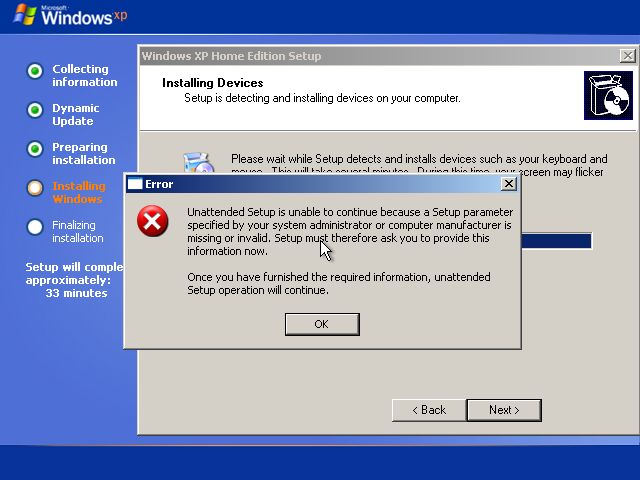
Apart from receiving the following error message, the CD seems to install a Dell-Free version of Windows XP Home ^_^


If anyone has more information on how to fix this so that the errormessage does not show up please email me at dean[dot]bergin[at]gmail.com

 
Google+